What Is ERP and What Does It Cover? Next-Generation ERP and the Role of AI
What is ERP and what does it cover? Learn about next-generation ERP solutions from Arca Yazılım that bring finance, stock, production and e-Transformation processes together on a single platform.
ERP is usually discussed as a technical software decision, but the real question is far more practical: where company information is kept, and who can reach it.
There is a familiar scene in most manufacturing and trading companies. A customer calls to ask where their order stands. The sales rep hangs up and immediately rings production or planning. Planning presses the warehouse; the warehouse supervisor says, "That raw material arrived this morning, but we haven't booked it in yet." After half an hour of phone traffic someone calls the customer back — and the delivery date they give is still not firm.
The problem here is not that people are careless. It is that the data does not live in one place. Part of it sits in an Excel file on someone's computer, part in the accounting program, part in WhatsApp threads. When the same question gets a different answer from every department, what is missing is not a program but a shared order that has everyone looking at the same record.
ERP exists precisely to remove that confusion.
What Is ERP?
ERP stands for Enterprise Resource Planning, and at its simplest it is the company's shared ledger. It brings everything together on one platform — financial movements, stock levels, personnel records, production steps. Once a piece of information is entered, everyone with permission sees the same current record.
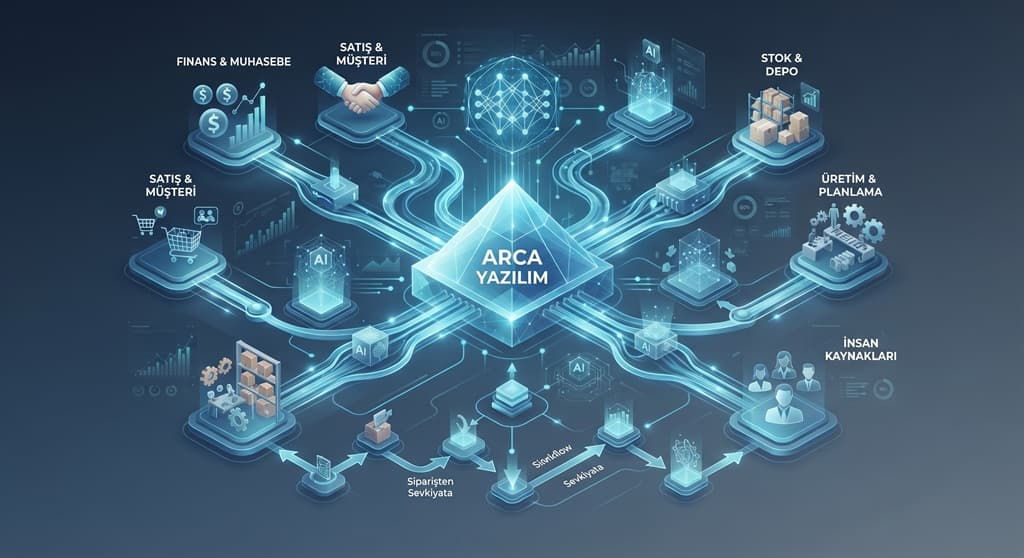
The moment an order is taken, warehouse stock becomes visible. Missing material drops onto the requirements list, the production team sees the work order, and on the accounting side the ledger entry and the invoice are generated from that same record. Nobody has to ask another department, "Could you email me the details?"

An order moves through ERP on a single record; without ERP the same information sits in five separate places.
What Does ERP Cover?
What an ERP covers depends on your sector and how you work. A wholesaler and a complex manufacturing plant plainly do not need the same things; the production module one never opens is the heart of the other's business. The areas that typically stand out in an ERP are:
- Finance and Accounting: Cash and bank tracking, current accounts, e-Transformation (e-Invoice, e-Waybill) processes and period-end operations.
- Sales and Customer Relations: Price lists, quotation management, discount definitions and customer order history.
- Purchasing and Procurement: Comparing supplier quotes, goods receipt and order tracking processes.
- Stock and Warehouse Management: Inbound and outbound movements, serial/batch tracking, stock levels per warehouse and critical stock alerts. Seeing where a count discrepancy came from belongs here too.
- Production and Planning: Bills of materials, work orders, capacity utilisation, downtime tracking and actual cost calculation.
- Quality and Maintenance: Incoming inspection, non-conformity records, machine cards, preventive maintenance schedules and spare part management.
- Human Resources: Personnel records, leave tracking, shift and expense management.
- Management Reports: Cash flow, profitability and overall direction. In other words, the one screen the owner looks at each morning.

The core areas an ERP covers. Which modules are opened depends on the sector; the shared record sits at the centre of all of them.
e-Transformation Solutions: e-Invoice, e-Archive, e-Waybill, e-Ledger
In Türkiye, part of any ERP conversation looks straight at regulation. For companies above a certain turnover, e-Invoice, e-Archive, e-Waybill and e-Ledger are not a preference but an obligation; the scope widens every year, and some lines of business are included regardless of turnover. So one of the first questions to ask when evaluating an ERP is this: do these documents live inside the system, or in a separate program?
Briefly, what each one is for:
- e-Invoice. Used when the buyer is also registered in the e-Invoice system. It has the same legal force as a paper invoice; the document reaches the other party through the system, with no hand delivery or post.
- e-Archive Invoice. Issued when the buyer is not an e-Invoice user or is an end consumer. It is created electronically and reported to the Revenue Administration.
- e-Waybill. The electronic form of the dispatch note. It must be issued before the goods leave; set up correctly, the shipment and the stock record agree with each other.
- e-Ledger. Keeping the journal and general ledger electronically, with certificates uploaded periodically to the Revenue Administration. Over time e-Self-Employment Receipt, e-Producer Receipt and e-Expense Voucher have joined the list.

When each of the four core e-documents applies, and the path the document follows.
The critical part is where these documents are produced. In companies running e-Transformation from a separate program the picture is usually this: the order is in the ERP, the invoice is on another screen, and month-end goes on reconciling the two. The same information is entered twice, and the gap between the two records only shows up when something goes wrong.
In an integrated setup the invoice is born from the shipment itself: issue the waybill and stock falls, the invoice is produced from the same record, and the ledger entry and accounting voucher follow on their own behind it. To the user it is a single operation.
In practice there are three routes. Companies issuing few documents can use the Revenue Administration portal, most work with a private integrator, and high-volume companies prefer direct integration. Whichever you choose, a financial seal or electronic signature is required, and documents must be retained for the legal period. It is worth settling at contract stage whether that retention duty sits with you or with your service provider.
Because the thresholds are updated every year, the answer "we're not in scope" ages quickly. Not being ready on the date you enter scope means not being able to issue invoices — which delays collection directly.
Signs That You Need an ERP
"Do we really need an ERP?" — if that is the question, look at whether these problems occur in your business:
- Month-end closing and account reconciliation take days.
- Different departments keep entering the same information into their own spreadsheets.
- The stock figure in the system never quite matches the physical count in the warehouse.
- You cannot work out precisely what a product costs you.
- The whole workflow depends on an Excel file one person maintains; when they take leave, work stalls.
If several of these sound familiar, the current setup is no longer carrying the workload.
What to Look For in a Next-Generation ERP
There is a fair wariness in the market, earned by ERP projects that dragged on and overran their budgets. To reduce that risk, these are the criteria worth applying to a modern solution:
- Ease of use. A warehouse operator or field technician should not struggle with the system. A plain, legible interface directly affects how long adoption takes.
- Mobile and flexible access. A sales team preparing a quote in front of the customer; a manager seeing cash flow while travelling. Information that waits for someone to get back to the office does not arrive in time for the decision.
- Fit with your processes. Rather than forcing you into its own patterns, the software should adapt to your existing approval and authorisation structures.
- Data exchange with other software. A system that talks directly to banks, e-commerce platforms, carriers and the Revenue Administration's e-Transformation services puts an end to double entry.
- Module-by-module rollout. Most projects stall on the decision to "switch everything on the same day". Starting with the process that hurts most and moving step by step also means you see the first benefit within weeks.
- Transparent cost and regulatory upkeep. Legislative changes covered by updates; licence, maintenance and support lines clear from day one.
- Producing decisions, not reports. Nobody reads a forty-page report. A good system tells you the deviation itself: which customer went over their limit, which order's delivery is at risk, which cost line rose quietly this month.
The Real Role of AI in ERP Systems
Lately AI turns up in ERP brochures as it does everywhere else. Setting the marketing aside and looking at the field, these are the applications that genuinely work and save time today:
- Document reading. Incoming invoices and waybills are read and the record comes back ready; the user gives the approval. There is nothing to miss about keying in a forty-line invoice by hand, and this is usually where the fastest return comes from.
- Demand forecasting. Reading past periods to see stock needs in advance and avoid unnecessary inventory cost.
- Anomaly alerts. Discount rates outside the norm, duplicate invoices, a purchase price far above the usual. These slip past the human eye; the system catches them.
- Fast data queries. Instead of complex report screens, asking "what were the three best-selling products last month?" and getting an immediate answer.
Setting expectations
One caveat: if the underlying data is wrong, AI will not produce the right answer. It will not fix an incorrect stock record — it will only be wrong faster. And the decision always stays with a person; AI brings the suggestion, the manager approves it.
So "AI-powered" on its own says nothing. The sharper question is: which task, on which screen, and how accurately?
How Should the Process Start?
A successful ERP transition needs some preparation inside the business before any software is chosen:
- Put your current processes on paper. Make the steps from order acceptance to delivery explicit; if you cannot describe it on one page, the software cannot either.
- Rather than converting every module at once, start with the area costing the company the most time or money.
- Clean up and standardise your account cards, stock codes and bills of materials before migrating them. Fixing them afterwards takes three times the effort.
- Name a project lead inside the company who will own the process.
- Take the views and feedback of the people who will use the system all day into account during setup. When the person at the screen objects, they are usually right.
In Closing
Arca Yazılım provides ERP implementation, migration from an existing system and e-Transformation services for manufacturing and trading companies.
Our approach does not start with selling software: first we analyse your current operation and needs, then decide together which module to begin with. When we see a structure that does not fit your needs, we say so plainly from the start.
To learn more about our ERP solutions, call us on 0312 256 72 78 , or visit arcayazilim.com for details and our other solutions.