
Enterprise WhatsApp Messaging Automation via Wati
How to set up Wati integration? Learn the WhatsApp Business API process from template approval to message delivery.
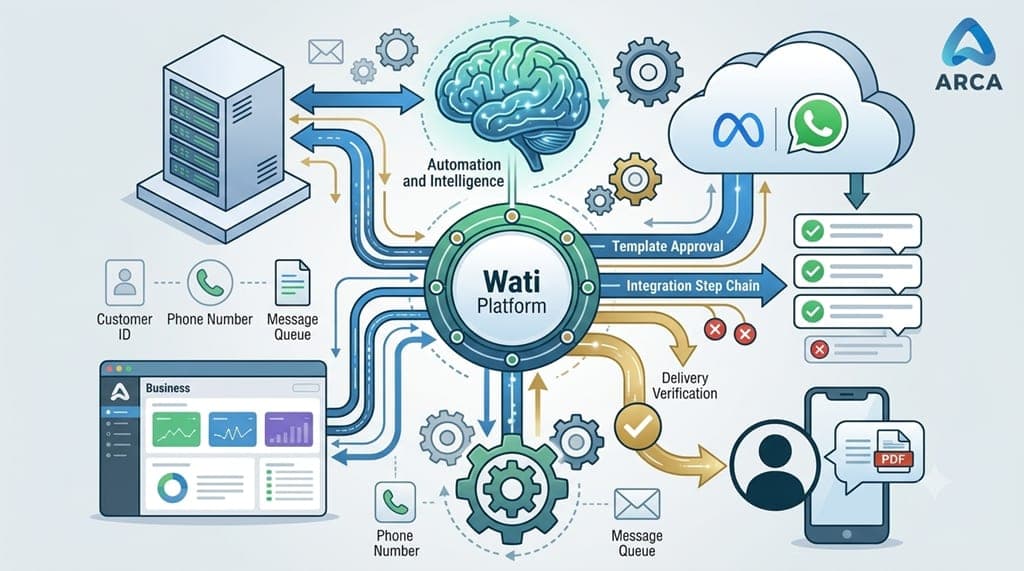

Adding Wati integration to a software application is not simply a matter of placing a button in the interface. From template approval and message delivery workflows to media headers and delivery verification, there are many technical details to consider. In this article, based on our technical experience from a real-world project, we explain how the process works from end to end.
Businesses that want to send notifications, thank-you messages, or documents to their customers via WhatsApp instead of SMS or email eventually face the same question: “How can we integrate this into our own software?”
The answer often involves a service provider such as Wati. These services provide access to Meta's official WhatsApp Business Platform. In this article, we will look at both what Wati is and whether it is WhatsApp itself, as well as how a software team can technically build this integration from start to finish.
What Is Wati, and How Is It Different from the WhatsApp Business API?
Wati is not WhatsApp itself. It is an official BSP (Business Solution Provider) that provides access to Meta's WhatsApp Business Platform (Cloud API) infrastructure.
In other words, messages are technically still delivered to WhatsApp users through Meta's servers. Wati makes this process accessible to software teams through a simple REST API, a template management interface, and an inbox interface for managing conversations.
This distinction is important because it also defines the boundaries of the integration. Message content cannot simply be sent as arbitrary free-form text; depending on the type of message and the applicable WhatsApp policies, approved message templates are required.
Therefore, when a software application is described as having a “Wati integration,” it essentially means that the application has an infrastructure capable of sending messages through Wati while complying with Meta's WhatsApp messaging and template requirements.
Why Are Businesses Turning to This Integration?

WhatsApp can provide a highly direct communication channel compared with traditional SMS and email. The ability to deliver notifications quickly, reach users through a familiar messaging platform, and send images or documents directly within a conversation makes WhatsApp an attractive option for businesses.
Some of the most common use cases we encounter in enterprise software include:
- Transaction notifications: Payment confirmations, delivery updates, and appointment reminders.
- Thank-you and feedback messages: Automated thank-you workflows after a donation, order, or completed service.
- Document and form delivery: Sending an image, PDF, or personalized document directly to a customer's WhatsApp conversation.
- Bulk or filtered announcements: Sending a template message to all records that meet specific criteria.
What Happens Behind the Scenes When a Message Is Sent?

The core of the integration may look like a single HTTP request, but behind the scenes, the process involves three different parties in sequence: your application, Wati, and Meta.
A typical scenario in which an application sends a template message together with an image follows this general flow:
Important: An HTTP 200 response from Wati does not necessarily mean that the message has been delivered to the WhatsApp user. It only indicates that the request was successfully accepted by Wati and queued for processing. The actual delivery status is determined at a later stage. Overlooking this distinction is one of the most common misconceptions in WhatsApp integrations.
How to Build a Wati Integration Step by Step

When adding Wati integration to an enterprise application, the process generally follows a sequence of interconnected steps. Each stage depends on the previous one and forms a concrete end-to-end workflow.
1. Wati Account and Meta Business Verification
The business creates a Wati account and verifies its WhatsApp Business number through Meta Business Manager. The necessary business and WhatsApp account setup must be completed before message templates can be submitted for approval.
2. Creating and Submitting Message Templates for Meta Approval
Every message template to be used for sending messages — including the header, body, and any image or document header — is created through Wati's template management interface.
The template is then submitted to Meta for review. Approval can often be completed within hours, although the timing may vary.
Rejected templates may be returned for reasons such as content that does not comply with WhatsApp's messaging policies or incorrectly defined or missing variables.
3. Configuring API Credentials on the Backend
The API credentials and relevant channel information obtained from the Wati dashboard are configured on the application's server side and stored securely.
At this point, sending a WhatsApp message from the application essentially becomes an authenticated HTTP request to the relevant API endpoint.
4. Connecting the Sending Workflow to the Application
A message-sending step is added to existing workflows such as “Send Thank-You Message” or “Send Document.”
This step calls the relevant template and supplies the required parameters in the correct order.
In a well-designed integration, this mapping should not be hard-coded into the application. Ideally, administrators should be able to configure which application data is mapped to which template variable through the management interface.
5. End-to-End Testing and Going Live
A real message is sent to a real phone number using an approved template. Delivery, media loading, and possible error scenarios are then verified.
Small differences between development and production environments often become apparent at this stage. For example, images or documents used in messages may need to be accessible through a publicly reachable URL.
Real-World Details You May Encounter During the Integration

Wati integration documentation can make the process look like a five-minute task. In practice, documentation gaps, assumptions, and implementation details can make certain parts considerably more challenging.
Here are a few examples from our own projects that can cause unexpected issues and consume development time.
Media Headers
If a template uses an image or PDF in its header, the media URL is not necessarily passed as a separate generic “media” field.
Instead, the media value needs to be provided according to the template's header configuration and parameter structure.
Assuming the wrong parameter name or structure can result in an API request that appears successful while the actual WhatsApp message is never delivered.
This is particularly important because a template with a required media header cannot be processed correctly if the expected media parameter is missing or incorrectly mapped.
What Does a “Successful” API Response Actually Mean?
A successful API response only confirms that the request was accepted by Wati. It does not necessarily confirm that the message reached the recipient's WhatsApp account.
Actual delivery takes place later through the WhatsApp infrastructure, and failures at this stage may not be immediately reflected in the initial API response.
For this reason, integration testing should not stop at checking the API response. The message should also be verified on an actual device, together with its media and delivery status.
Publicly Accessible Media URLs
The URL of an image or document being sent must be accessible from outside the local development environment so that the relevant service infrastructure can retrieve it.
A URL that works on a developer's local machine may not work once the application is deployed to production. Before going live, media URLs should therefore be tested from an externally accessible environment.
The difference between an integration that “appears to work” and one that “actually delivers messages” can sometimes come down to a single parameter name or configuration detail.
What Does This Integration Bring to a Business?

In short, compared with SMS, WhatsApp integration may require more preparation, particularly because of the template approval process.
However, it provides businesses with a direct communication channel and enables richer interactions through images, documents, and structured message templates.
The real value comes from integrating these capabilities into existing business workflows rather than simply adding another messaging channel.
Conclusion

A properly implemented WhatsApp Business Platform integration through Wati can significantly change how software communicates with customers.
However, the value of this integration does not lie simply in connecting an application to an API. The real value comes from designing the entire process correctly — from template approval and media delivery to error handling and delivery verification.
When these components are designed as part of a complete workflow, WhatsApp can become a powerful communication layer within an enterprise software application.
Want to Add WhatsApp Integration to Your Software?
If you would like to learn more about integrating WhatsApp into your software, contact us at +90 312 256 72 78.
For more information and to explore our other software solutions, visit www.arcayazilim.com.